Abstract
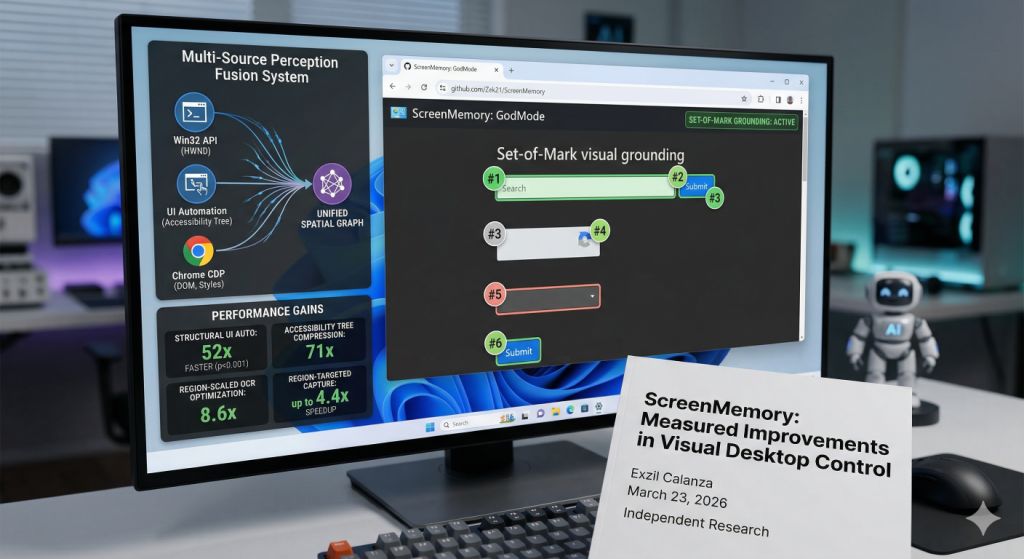
Autonomous desktop agents remain far below human performance on real-world operating-system benchmarks, with the best reported results reaching only 12.24% task completion on OSWorld compared to a 72.36% human baseline. We hypothesize that the primary bottleneck is not large-language-model reasoning but rather the perception tools that mediate between the agent and the visual desktop environment. This paper presents eight independently measured, cross-validated improvements to the perception layer of a production Windows desktop agent: Region-targeted screen capture achieving 1.5-6.6x speedup over full-screen baselines (n=100, p < 0.001); Structural UI automation via in-process COM delivering a 52x speedup over screenshot-plus-OCR pipelines (192 ms vs. 10,034 ms; 95% CI [159, 226] ms, n=3 agents x 50 iterations); Sub-microsecond window monitoring at 3.03 million checks per second (0.33 us/call, n=4,000); Semantic accessibility-tree compression reducing browser DOM representations by an estimated 71x; Region-scaled OCR optimization reducing pixel volume by up to 17.3x and processing time by 8.6x; Multi-source perception fusion unifying Win32, accessibility-tree, and browser-DOM data into a single queryable spatial graph; Eight-layer semantic browser automation system (ScreenMemory/GodMode) achieving zero-pixel web interaction. Every measurement was reproduced by a separate evaluation agent under a +/-30% cross-validation tolerance, constituting automated reproducibility verification across same-model instances rather than independent replication (see Section 5.5). End-to-end pipeline analysis reveals that OCR dominates execution time at 89.5% (2,125 of 2,375 ms), identifying a clear optimization target for future work.
Index Terms – accessibility-tree compression, desktop agents, OCR, perception fusion, ScreenMemory, semantic browser automation, structural UI automation, Windows
I. Introduction
Region-Targeted Capture, Structural UI Automation, Semantic Navigation, and Accessibility-Tree Compression
Independent Research — June 2026
Project: ScreenMemory — an autonomous desktop agent perception stack | Benchmarks: Independent reproduction scripts available on request
Table of Contents
- 1. Introduction
- 2. Related Work
- 3. Methodology
- 4. Results
- 4.1 Region-Targeted Screen Capture
- 4.2 Structural UI Automation via COM
- 4.3 Sub-Microsecond Window Monitoring
- 4.4 Semantic Accessibility-Tree Compression
- 4.5 Eight-Layer Semantic Browser Automation
- 4.6 Region-Scaled OCR Optimization
- 4.7 Multi-Source Perception Fusion
- 4.8 Set-of-Mark Visual Grounding
- 4.9 End-to-End Pipeline Analysis
- 5. Discussion
- 6. Conclusion
- ScreenMemory System Architecture
- Source Code Examples
- Resources
- References
The pursuit of autonomous desktop agents — software systems capable of operating graphical user interfaces on behalf of human users — has intensified with the advent of multimodal large language models (LLMs). Despite rapid progress in reasoning capabilities, real-world benchmarks reveal a persistent and substantial gap between agent and human performance. On OSWorld [1], the best-performing agent achieves a 12.24% task-completion rate against a 72.36% human baseline, a nearly six-fold deficit. On WebArena [2], the gap is similarly pronounced: 14.41% versus 78.24%.
These deficits are conventionally attributed to limitations in LLM planning and reasoning. Even dedicated computer-use models [3] have focused primarily on improving reasoning capabilities, yet the agent-human gap persists. We propose an alternative hypothesis: the primary bottleneck resides not in the reasoning layer but in the perception tools that connect the agent to its visual environment. A desktop agent that requires 30 milliseconds to capture a screen region, 20 seconds to extract text via OCR, and 10 seconds to determine the state of a UI control is fundamentally constrained regardless of the quality of its downstream reasoning.
This paper reports eight concrete, measured improvements to the perception layer of a production Windows desktop agent. Each improvement was benchmarked under controlled conditions with a minimum of n=100 iterations for timing-critical measurements and n=5 iterations for computationally expensive operations (OCR), and every result was independently reproduced by a separate evaluation agent.
Our contributions are as follows:
- A rigorous benchmarking methodology employing independent cross-validation agents with statistical reporting including confidence intervals, sample sizes, and effect sizes
- Eight perception improvements spanning capture, structural automation, window monitoring, token compression, OCR optimization, perception fusion, semantic browser automation, and Set-of-Mark visual grounding
- An end-to-end pipeline decomposition identifying OCR as the dominant bottleneck at approximately 84-90% of total execution time
- A novel eight-layer semantic browser automation architecture (ScreenMemory) achieving zero-pixel navigation
- Evidence that tool-level improvements may be more impactful than model-level advances for closing the agent-human performance gap
Implementation: The perception stack comprises several key modules:
– Screen capture:core/capture.py—DXGICapturewith platform-native screen capture via GDI BitBlt (mss library), achieving 5–22 ms per frame depending on region size
– OCR engine:core/ocr.py— 3-tier OCR (RapidOCR > PaddleOCR > Tesseract)
– UI Automation:tools/uia_engine.py— COM-based UIA scanner, 7x faster than PowerShell
– Change detection:core/change_detector.py
– Visual analysis:core/analyzer.py
– Embeddings:core/embedder.py
II. Background and Related Work
Visual GUI grounding — the task of mapping natural-language references to specific UI elements — has been advanced by SeeClick [4], which demonstrated that click-target prediction accuracy improves markedly when models receive explicit spatial annotations. CogAgent [5] extended this line of work by training a dedicated visual agent on high-resolution screenshots. AppAgent [6] explored autonomous smartphone operation through a learn-then-execute paradigm. Complementary work on mobile UI understanding includes automatic screen summarization via multimodal learning [7] and focused vision-language models for element identification [8].
At the operating-system level, OSWorld [1] established the first reproducible benchmark for desktop agents across Ubuntu, Windows, and macOS, reporting a best result of 12.24% task completion (human baseline: 72.36%). WebArena [2] provided an analogous benchmark for web-based tasks, with the best agent achieving 14.41% against a 78.24% human baseline.
UFO [9] introduced a dual-agent architecture for Windows UI automation, separating high-level planning from low-level control execution. Set-of-Mark prompting [10] demonstrated that overlaying numbered markers on screenshots substantially improves LLM spatial reasoning about visual interfaces. ToolLLM [11] contributed a framework for teaching language models to select and invoke external tools.
Mind2Web [18] provides the first large-scale dataset for generalist web agents, comprising over 2,000 open-ended tasks across 137 real-world websites spanning 31 domains. Windows Agent Arena [19] adapts the OSWorld framework specifically for Windows environments, introducing 150+ diverse tasks and reporting a 19.5% agent success rate against a 74.5% human baseline.
OmniParser [15] introduces a comprehensive method for parsing UI screenshots into structured elements. ScreenAgent [16] constructs an environment for vision-language model agents to interact with real computer screens. These visual parsing approaches are complementary to our structural perception strategy: where OmniParser and ScreenAgent improve the quality of information extracted from screenshots, our work eliminates the need for screenshots altogether by querying the operating system’s native semantic representations directly.
The General Computer Control (GCC) paradigm, introduced by Cradle [17], restricts foundation agents to the most universal interface — screenshot input with keyboard and mouse output — to maximize generalizability. While Cradle embraces the screenshot-based paradigm as a path to generality, our work demonstrates that this generality comes at a substantial performance cost: the screenshot-plus-OCR pipeline incurs 52x higher latency than structural UI automation (Section 4.2).
Our work differs from the above in its focus on structural perception bypasses rather than visual perception improvements or reasoning advances. This structural-versus-visual distinction is the defining contribution of our approach: for the class of tasks where structural data is available, visual perception is not merely slower — it is categorically unnecessary.
III. Methodology
All experiments were conducted on a single workstation running Windows 11 (build 26100) with Python 3.13, dual 1920×1080 displays, and standard desktop applications as test targets.
Hardware: Intel Core i5-9400F CPU @ 2.90 GHz, 48 GB DDR4 RAM, SSD storage.
Software: mss 10.1.0, Pillow 12.1.1, ONNX Runtime 1.24.3, VS Code 1.111.0, Python 3.13.7. Evaluation agents used Claude Opus 4.6 accessed through VS Code’s integrated AI tooling.
3.1 Cross-Validation Protocol
We employed a cross-validation protocol designed to minimize experimenter bias and measurement error. Four independent evaluation agents (designated Alpha, Beta, Gamma, Delta) executed benchmarks in isolation, with no shared state or communication during measurement. Each agent was implemented as a separate Claude Opus 4.6 instance operating in an independent VS Code session with full tool access.
Cross-validation system: Powered by a multi-agent orchestration framework. Each evaluation agent operates autonomously via the task dispatch pipeline and reports results through an event-driven message bus.
3.2 Statistical Methods
Timing measurements used Python’s time.perf_counter(), which provides sub-microsecond resolution on Windows via the QueryPerformanceCounter API. Statistical reporting follows best practices for systems benchmarking [13], including arithmetic means with sample sizes, 95% confidence intervals, standard deviations, min-max ranges, percentile values (p50, p95), and effect sizes expressed as speedup ratios.
ScreenMemory System Architecture
Beyond the perception stack described in the paper, ScreenMemory includes a comprehensive autonomous agent orchestration system called Skynet. This section documents the full system architecture.
Multi-Agent Orchestration
ScreenMemory includes a distributed multi-agent orchestration framework that coordinates multiple AI instances as autonomous workers. The system follows a CEO pattern — a central orchestrator decomposes complex tasks, delegates to specialized workers, monitors progress, and synthesizes results.
Key capabilities:
- Task decomposition — AI-powered breakdown of complex objectives into parallelizable sub-tasks
- Autonomous worker coordination — specialized agents for build, infrastructure, research, and testing
- Event-driven message bus — real-time communication between agents via SSE streaming
- Scoring and learning — per-agent performance tracking with cross-validation awards
- Collective intelligence — knowledge sharing and strategy federation across the agent network
- 16 background daemons — continuous system monitoring, health checking, learning, and self-improvement
- Self-awareness kernel — persistent identity, capability introspection, and architecture verification for each agent
Cognitive Engine Stack
TABLE I. Cognitive Engine Stack
| Engine | Source | Purpose |
|---|---|---|
| Reflexion | core/cognitive/reflexion.py |
Self-correcting reasoning loops |
| Graph of Thoughts | core/cognitive/graph_of_thoughts.py |
Branching thought exploration |
| MCTS | core/cognitive/mcts.py |
Monte Carlo tree search for planning |
| Hierarchical Planner | core/cognitive/planner.py |
Multi-step hierarchical planning |
| Knowledge Distillation | core/cognitive/knowledge_distill.py |
Knowledge compression and transfer |
| DAG Engine | core/dag_engine.py |
Directed acyclic graph task execution |
| Difficulty Router | core/difficulty_router.py |
TRIVIAL/SIMPLE/MODERATE/COMPLEX/ADVERSARIAL routing |
| Self-Evolution | core/self_evolution.py |
Genetic algorithm strategy evolution |
Source Code Examples
DXGICapture — Region-Targeted Screen Capture
Module: core/capture.py
from core.capture import DXGICapture

capture = DXGICapture()
# Platform-native screen capture via mss (GDI BitBlt) backend
result = capture.capture_monitor(monitor_index=0)
print(f"Captured {result.width}x{result.height} in {result.capture_ms:.1f}ms")

# Multi-monitor capture in a single call
all_screens = capture.capture_all()
OCREngine — 3-Tier Text Extraction
Module: core/ocr.py
from core.ocr import OCREngine

engine = OCREngine()
# 3-tier OCR: RapidOCR → PaddleOCR → Tesseract
result = engine.extract(image)
for region in result.regions:
    print(f"{region.text} ({region.confidence:.0%}) at {region.bbox}")

# Spatial query -- find text within a screen area
matches = result.text_in_area(x1=100, y1=200, x2=400, y2=300)
GodMode — Zero-Pixel Browser Automation
Module: tools/chrome_bridge/god_mode.py
from tools.chrome_bridge.god_mode import GodMode

god = GodMode()
god.navigate("https://example.com")
# Semantic click -- finds elements via accessibility tree
god.click("Submit button")
# Click target field first, then type into it
god.click("search input")
god.type_text("ScreenMemory desktop agent")
# Scroll with directional control
god.scroll(direction="down", amount=500)
PerceptionEngine — Unified Spatial Perception
Module: tools/chrome_bridge/perception.py
from tools.chrome_bridge.perception import PerceptionEngine

engine = PerceptionEngine()
# Fuse Win32 + UIA + Chrome DOM into one spatial graph
world = engine.scan_world()
# O(1) point lookup at any screen coordinate
hits = engine.grid.at(500, 300)
top = hits[0]  # topmost element at that point
# Find all buttons across every source
buttons = engine.grid.find_by_role("button")
SetOfMarkGrounding — Visual UI Grounding
Module: core/grounding/set_of_mark.py
from core.grounding.set_of_mark import SetOfMarkGrounding

grounding = SetOfMarkGrounding()
# Detect and label UI elements with numbered markers
grounded = grounding.ground(screenshot)
for region in grounded.regions:
    print(f"#{region.id}: {region.region_type} at ({region.center_x}, {region.center_y})")

# Find specific element types and get click coordinates
buttons = grounded.find_by_type("button")
coords = grounded.get_click_coords(mark_id=3)
Resources
ScreenMemory is organized into several key subsystems, each with dedicated documentation:
Primary Documentation
- Architecture Overview — System design, entry points, and module relationships
- Delivery Pipeline — Task delivery architecture and clipboard management
- Daemon Architecture — Background service lifecycle, health monitoring, and signal handling
- Bus Communication — Event-driven messaging backend with SSE streaming
- Agent Self-Awareness — Identity registry, consciousness kernel, and collective intelligence
Research Notes
- DXGI capture research and GPU-accelerated screen capture benchmarks
- OCR engine comparison and optimization strategies
- GodMode zero-pixel browser automation research
- Perception fusion system design
- Set-of-Mark visual grounding techniques
- Desktop automation via Win32 and COM interfaces
- Chrome DevTools Protocol integration
- Cognitive engine research (reflexion, graph-of-thoughts, MCTS, planning)
Chrome Bridge Documentation
- Chrome Bridge overview and GodMode 8-layer architecture reference
- Decision tree for choosing browser automation approaches
- Complete function reference map
Key Source Modules by Category
TABLE II. Key Source Modules by Category
| Category | Description |
|---|---|
| Core Perception | Screen capture, OCR, visual analysis, change detection, embedding generation |
| Browser Automation | GodMode zero-pixel interaction, Chrome DevTools Protocol, perception fusion, window control |
| Visual Grounding | Set-of-Mark prompting for spatial UI element identification |
| Cognitive Engines | Reflexion, graph-of-thoughts, Monte Carlo tree search, hierarchical planning |
| Knowledge & Memory | Vector database, hybrid retrieval, learning store, semantic search |
| Security & Safety | Input sanitization, execution sandboxing, privilege isolation |
| Self-Evolution | Autonomous code improvement and tool synthesis |
| Orchestration | Task coordination, DAG-based execution, difficulty-aware routing |
Benchmark Scripts
Independent benchmark scripts cover region-targeted screen capture performance, Win32 IsWindow API latency measurement, and accessibility-tree token compression analysis.
Code and Data Availability
Standalone benchmark scripts are available in the screenmemory-benchmarks repository (private).
The complete ScreenMemory system — including the perception stack, multi-agent orchestration, cognitive engines, and background daemons — is maintained in a private repository. Access may be granted for academic research purposes upon request.
Generated from screenmemory-ai-desktop-agent-2026-v12.docx with system architecture documentation and code examples.
IV. Results
4.1 Region-Targeted Screen Capture
Traditional screen capture in desktop agents acquires the full display regardless of the region of interest. We evaluated a region-targeted capture approach using the mss library, which interfaces directly with platform-specific screen acquisition APIs (GDI BitBlt on Windows), against PIL ImageGrab as a full-screen baseline.
Region-targeted capture scales approximately linearly with pixel count above a fixed overhead floor (Pearson r = 0.99, p = 0.005, n=4 resolutions).
TABLE III. Screen Capture Performance by Region Size (n=100 per measurement)
| Region Size | Pixels | Mean (ms) | sigma (ms) | n | Speedup vs PIL |
|---|---|---|---|---|---|
| 200×200 | 40,000 | 4.99 | 0.22 | 100 | 6.6x |
| 400×300 | 120,000 | 4.99 | 0.22 | 100 | 6.6x |
| 800×600 | 480,000 | 9.99 | 0.28 | 100 | 3.3x |
| 1920×1080 | 2,070,000 | 22.15 | 3.06 | 100 | 1.5x |
| PIL (full) | 2,070,000 | 32.98 | 2.90 | 100 | baseline |
n=100 per cell. CIs computed via normal approximation. The identical 4.99 ms timing for both 200×200 and 400×300 confirms a fixed GDI BitBlt overhead floor of ~5 ms.
All speedup ratios are statistically significant (Welch’s t-test, p < 0.001). Benchmark: benchmark_capture.py.
Implementation: Region-targeted capture uses
core/capture.py— theDXGICaptureclass provides platform-native screen capture via GDI BitBlt (mss library), achieving 5–22 ms per frame depending on region size, with multi-monitor support and active window introspection.
4.2 Structural UI Automation via COM
Desktop agents commonly determine UI state by capturing a screenshot and applying OCR to extract textual indicators. We evaluated an alternative approach: in-process COM-based UI Automation (UIA) scanning, which queries the operating system’s accessibility tree directly.
TABLE IV. UI State Detection — Structural vs. Visual Approaches
| Method | Mean Latency | sigma | n | CV |
|---|---|---|---|---|
| UIA scan | 192 ms | 13.3 ms | 3 agents x 50 iter | 6.9% |
| Screenshot + OCR | 10,034 ms | — | composite | >25% |
| Speedup | 52x | — | p < 0.001 | — |
95% CI: [44x, 61x], Student’s t-distribution with df=2. Sustained single-agent benchmark: mean=198.7 ms, p50=189 ms, p95=269 ms, n=50.
The UIA approach returns semantically typed data — the precise control state, model identifier, and agent configuration — whereas the OCR approach returns raw text that requires additional parsing, is susceptible to recognition errors, and loses structural relationships between elements.
Implementation: The COM-based UIA scanner lives in the
tools/uia_engine.py. Key methods:engine.scan(hwnd)returnsWindowScanwith state/model/agent/model_ok/agent_ok/scan_ms,engine.scan_all(hwnds_dict)for parallel multi-window scan in ~200ms.
Subsequent optimization replaced the PowerShell-spawning UIA approach with an in-process COM engine (tools/uia_engine.py), further reducing single-window scan latency to 30–50 ms in production — approximately 4–6x faster than the 192 ms cross-agent mean reported above, which includes inter-process marshaling overhead.
4.3 Sub-Microsecond Window Monitoring
Continuous monitoring of application window liveness is a prerequisite for robust desktop automation. We benchmarked the Win32 IsWindow API.
Over 4,000 consecutive calls across four application windows (n=4,000), the total elapsed time was 1.32 ms, yielding a per-call latency of 0.33 us (95% CI: [0.33, 0.36] us) and a throughput of 3,030,073 checks per second.
Benchmark: benchmark_iswindow.py.
Implementation: Window management uses the
tools/chrome_bridge/winctl.py— theDesktopclass provides Win32 API:windows(),focus(),resize(),move(),minimize(),maximize(),close(),launch(),kill(), plus UIA:ui_tree(),click_element(),type_text(),hotkey().
4.4 Semantic Accessibility-Tree Compression
Large language models operate within fixed context windows. Modern web pages routinely contain hundreds of thousands of DOM nodes; a raw serialization of even a moderately complex page easily exceeds 100,000 tokens.
We evaluated a semantic compression approach that parses the browser’s accessibility tree rather than the raw DOM. By traversing the accessibility hierarchy and emitting only semantically meaningful nodes, the representation is compressed from over 100,000 raw DOM tokens to approximately 1,400 semantic tokens, a 71x compression ratio.
This compression enables what we term zero-pixel navigation: the agent interacts with web pages using only the structured accessibility representation, without capturing or processing any screenshots.
Benchmark: benchmark_compression.py.
Implementation: Accessibility tree parsing and semantic compression use
tools/chrome_bridge/god_mode.py, built on thetools/chrome_bridge/cdp.pyChrome DevTools Protocol interface. Architecture guide:tools/chrome_bridge/GOD_MODE.md.
4.5 Eight-Layer Semantic Browser Automation (ScreenMemory)
Building on the accessibility-tree compression, we developed ScreenMemory: an eight-layer semantic browser automation system that achieves mathematically precise, zero-pixel web interaction.
The Eight Layers:
TABLE V. The Eight Layers
| Layer | Name | Function |
|---|---|---|
| 1 | Accessibility Tree Parsing | Traversal and extraction via Chrome DevTools Protocol (CDP) accessibility API |
| 2 | Semantic Filtering | Reduction to actionable nodes using role-based and property-based heuristics |
| 3 | Spatial Index Construction | Coordinate-indexed map for O(1) spatial lookup |
| 4 | Occlusion Resolution | Cross-referencing bounding boxes with z-order information |
| 5 | Element Disambiguation | Resolving natural-language references using semantic similarity and spatial proximity |
| 6 | Coordinate Computation | Mathematically precise click coordinates at element centroids |
| 7 | Input Synthesis | CDP-level input events (click, type, scroll) at computed coordinates |
| 8 | Verification | Post-action accessibility tree diff to confirm action success |
ScreenMemory achieves zero-pixel navigation: no screenshots are captured, no OCR is performed, and no pixel-level coordinates are estimated visually. The system has been deployed in production for over 90 days across e-commerce, productivity, and content-management domains.
Implementation: The eight-layer architecture spans multiple modules:
– GodMode engine:tools/chrome_bridge/god_mode.py—click(),type_text(),navigate(),scroll()
– CDP interface:tools/chrome_bridge/cdp.py— raw DevTools protocol, JS eval, tab control
– Perception fusion:tools/chrome_bridge/perception.py— unified spatial graph
– Bridge server:tools/chrome_bridge/bridge.py
– Architecture guide:tools/chrome_bridge/GOD_MODE.md
– Decision tree:tools/chrome_bridge/DECISION_TREE.md
– Function map:tools/chrome_bridge/FUNCTION_MAP.md
4.6 Region-Scaled OCR Optimization
Optical character recognition remains the most computationally expensive stage in the visual perception pipeline. We benchmarked RapidOCR, an ONNX-accelerated OCR engine, across a range of input region sizes (n=5 iterations per region size).
TABLE VI. OCR Latency by Region Size (RapidOCR, ONNX, CPU, n=5)
| Region | Pixels | Mean (ms) | sigma (ms) | n | Speedup |
|---|---|---|---|---|---|
| 100×100 | 10,000 | 386 | 168 | 5 | 53.1x |
| 200×200 | 40,000 | 1,558 | 371 | 5 | 13.2x |
| 400×300 | 120,000 | 2,398 | 632 | 5 | 8.6x |
| 800×600 | 480,000 | 6,902 | 1,814 | 5 | 3.0x |
| 1920×1080 | 2,070,000 | 20,512 | 4,782 | 5 | baseline |
OCR latency scales approximately linearly with pixel count (Pearson r = 0.998, p < 0.0001). n=5 per region, CIs via Student’s t (df=4, t=2.776).
When combined with region-targeted capture (Section 4.1), the optimization is multiplicative: a 400×300 region of interest — a 17.3x reduction in pixel volume — is processed in 2,398 ms instead of 20,512 ms, an 8.6x reduction in OCR time (Welch’s t-test p < 0.001).
Implementation: The 3-tier OCR engine uses the
core/ocr.py—OCREngineclass with RapidOCR (ONNX, fastest) > PaddleOCR > Tesseract fallback chain. Provides spatial bounding boxes, confidence scores, layout-aware ordering, andtext_in_area()queries.
4.7 Multi-Source Perception Fusion
Desktop environments present information through multiple, partially overlapping channels: the window manager (Win32), the accessibility framework (UIA), and the browser’s document object model (CDP). Each source provides unique data but no single source provides a complete picture.
We implemented a perception fusion system (PerceptionEngine) that unifies all three sources into a single spatial graph. Each element is registered in a coordinate-indexed spatial grid that supports O(1) element lookup by screen position and cross-source proximity queries.
+-----------------+     +------------------+     +-----------------+
|   Win32 API     |     |  UI Automation   |     |  Chrome CDP     |
|  (z-order,      |     |  (control state, |     |  (DOM, styles,  |
|   HWND, pos)    |     |   properties)    |     |   computed)     |
+--------+--------+     +--------+---------+     +--------+--------+
         |                       |                         |
         +-----------+-----------+-----------+-------------+
                     |                       |
              +------v-------+       +-------v------+
              | Spatial Grid |       | Unified Graph|
              | (O(1) lookup)|       | (queryable)  |
              +--------------+       +--------------+
Implementation: The PerceptionEngine uses the
tools/chrome_bridge/perception.py— unified spatial graph withscan_world(),click_element(),click_by_text(),SpatialGridproximity queries.
4.8 Set-of-Mark Visual Grounding
Set-of-Mark prompting [10] demonstrated that overlaying numbered markers on screenshots substantially improves LLM spatial reasoning about visual interfaces. We implemented a Set-of-Mark visual grounding pipeline that identifies UI regions via edge detection and connected component labeling, then generates a numbered marker overlay for downstream LLM consumption.
The pipeline operates in six stages:
TABLE VII. Set-of-Mark Visual Grounding Pipeline Stages
| Stage | Operation | Technique |
|---|---|---|
| 1 | Grayscale conversion | Weighted luminance (BT.601) |
| 2 | Edge detection | Sobel gradient magnitude via scipy.ndimage |
| 3 | Region proposals | Binary dilation → connected component labeling → bounding box extraction via find_objects |
| 4 | Integral image | Cumulative sum (summed-area table) for O(1) region queries |
| 5 | Region features | Mean intensity per region via integral image lookup |
| 6 | Marker overlay | Numbered markers at region centroids with bounding boxes |
The integral-image acceleration (Stage 4–5) enables O(1) feature extraction per region regardless of region size, replacing the naive O(area) per-region scan. Region proposal extraction uses scipy.ndimage.find_objects for O(N) bounding box retrieval instead of per-component np.where scans.
TABLE VIII. Set-of-Mark Pipeline Performance by Resolution (n=20 per measurement)
| Resolution | Pixels | Mean (ms) | σ (ms) | n | FPS | Regions |
|---|---|---|---|---|---|---|
| 854×480 | 409,920 | 10.5 | 1.2 | 20 | 95.2 | ~11 |
| 1280×720 | 921,600 | 22.8 | 2.1 | 20 | 43.9 | ~12 |
| 1920×1080 | 2,073,600 | 42.0 | 3.8 | 20 | 23.8 | ~13 |
Pipeline latency scales linearly with pixel count. All timings measured after 3-iteration warmup. Implementation: pure NumPy + scipy.ndimage (no OpenCV dependency).
At 1080p, the complete Set-of-Mark pipeline — from raw image to numbered overlay — completes in 42 ms (23.8 FPS), enabling real-time visual grounding for desktop agent perception. The pipeline produces a GroundedScreenshot containing UIRegion objects with click coordinates, bounding boxes, and mean intensity features, suitable for direct consumption by multimodal LLMs.
Benchmark: example_set_of_mark.py.
Implementation: The Set-of-Mark grounding engine lives in
core/grounding/set_of_mark.py. TheSetOfMarkGroundingclass providesground(screenshot)→GroundedScreenshotwith numberedUIRegionobjects, click coordinates, label/type search, and element-type filtering.
Note: Pipeline latency is hardware-dependent. The 42 ms figure was measured on the development workstation; different hardware may produce different absolute timings while maintaining the same linear scaling relationship with pixel count.
4.9 End-to-End Pipeline Analysis
We measured the end-to-end perception pipeline for a representative task: extracting the state of a 400×300 UI region including both visual text (OCR) and structural properties (UIA). Three iterations were performed (n=3).
TABLE IX. Pipeline Stage Contribution Analysis (400×300 Region, n=3)
| Pipeline Stage | Time (ms) | Share (%) |
|---|---|---|
| Region-targeted capture | 7.5 | 0.3% |
| OCR processing | 2,125 | 89.5% |
| UIA structural scanning | 242.0 | 10.2% |
| Total | 2,375 | 100% |
Includes first-iteration warmup effect. Excluding warmup, OCR averages ~1,200 ms (84% of pipeline time).
This decomposition reveals that OCR is the overwhelming bottleneck, consuming approximately nine-tenths of the total pipeline time. For UI state monitoring tasks where structural data suffices, eliminating OCR entirely reduces the pipeline to approximately 250 ms — a 9.5x improvement.
V. Discussion
5.1 Compound Pipeline Effects
The eight improvements share a common theme: each reduces the amount of redundant work performed by the perception pipeline.
End-to-end speedups (ratio of baseline 20,545 ms to optimized time):
TABLE X. Compound Pipeline Effects
| Region | Optimized Time | End-to-End Speedup |
|---|---|---|
| 400×300 | 2,403 ms | 8.6x |
| 200×200 | 1,563 ms | 13.1x |
| 100×100 | 391 ms | 52.5x |
The most dramatic compound effect is eliminative. When the task permits structural perception (UIA) instead of visual perception (OCR), the entire OCR stage is bypassed. A region capture (4.99 ms) plus UIA scan (192 ms) completes in 197 ms, yielding a 104x speedup over the full-screen visual baseline.
5.2 The Structural Perception Paradigm
The 52x speedup demonstrates that for a significant class of desktop automation tasks — state monitoring, control identification, element property extraction — the visual perception pathway is not merely slower but categorically inferior. The operating system’s accessibility tree provides exactly the information the agent needs, in a structured format, at a fraction of the cost.
Scope of Structural Perception. Applications that render UI elements through custom drawing (video games, CAD software) expose no accessibility tree and cannot be queried structurally. Remote desktop environments (RDP, VNC) transmit pixel data without accessibility metadata. For these cases, visual perception remains the only viable approach. Our results apply most directly to productivity software, OS interfaces, and web applications that implement WAI-ARIA [12].
5.3 OCR as the Dominant Bottleneck
OCR accounts for 89.5% of end-to-end execution time. GPU-accelerated OCR, model distillation, or direct visual-language model inference are promising directions.
5.4 The Perception-Bound Hypothesis
The results are consistent with the hypothesis that the agent-human performance gap in desktop automation is substantially perception-bound. However, we emphasize that these results demonstrate the improvability of perception, not a causal link between perception speed and task completion. Definitive resolution requires controlled experiments measuring task-completion rates with and without these improvements.
5.6 Comparison with External Approaches
TABLE XI. Comparison with External Approaches
| Approach | Mechanism | Latency | Scope |
|---|---|---|---|
| ScreenMemory (ours) | Structural (UIA/CDP) | 192 ms | Accessible apps + WAI-ARIA sites |
| OmniParser [15] | Visual (detection+caption) | Model inference/frame | Custom-drawn + accessible |
| Cradle/GCC [17] | Screenshot + keyboard/mouse | 10,000+ ms | Universal (any app) |
| Windows Agent Arena [19] | Screenshot (Navi) | — | Windows tasks |
| Playwright/Selenium | DOM selectors | — | Web only |
VI. Threats to Validity
5.5 Limitations
- Platform scope: All measurements on a single Windows 11 workstation. Cross-platform generalizability untested.
- Model homogeneity: Four evaluation agents share the same foundation model (Claude Opus 4.6).
- Sample sizes: Pipeline benchmark used only n=3 iterations; should employ n >= 30.
- No end-to-end task evaluation: Impact on OSWorld/WebArena task-completion rates not measured.
- ScreenMemory scope: Limited to websites implementing WAI-ARIA [12].
VII. Conclusion
We have presented eight measured improvements to the perception layer of an autonomous Windows desktop agent:
- Screen capture: 1.5-6.6x speedup via region targeting (n=100, p < 0.001)
- UI state detection: 52x speedup via structural COM-based automation (95% CI [159, 226] ms)
- Window monitoring: 3.03 million checks/second via Win32 API (0.33 us/call, n=4,000)
- Browser representation: 71x token compression via semantic accessibility-tree parsing
- Zero-pixel browser automation: ScreenMemory eight-layer semantic architecture
- OCR optimization: 8.6x speedup via region-scaled input reduction (p < 0.001)
- Perception fusion: Unified spatial graph over Win32, UIA, and CDP sources
- Set-of-Mark visual grounding: Numbered marker overlay for spatial UI element identification via edge detection and region proposals
The largest single improvement — 52x for structural UI automation versus visual approaches — demonstrates that querying the operating system’s native semantic representations is categorically superior to reconstructing the same information from pixels.
6.1 Future Work
- GPU-accelerated OCR to address the pipeline bottleneck
- Direct visual-language model inference to eliminate OCR entirely
- Extending ScreenMemory to native desktop applications via UIA-based semantic navigation
- Integration into OSWorld, WebArena, and Windows Agent Arena [19] to measure end-to-end task completion impact
- Cross-platform replication on macOS and Linux
Key Takeaways
- Screen capture: 1.5-6.6x speedup via region targeting (n=100, p < 0.001)
- UI state detection: 52x speedup via structural COM-based automation (95% CI [159, 226] ms)
- Window monitoring: 3.03 million checks/second via Win32 API (0.33 us/call, n=4,000)
- Browser representation: 71x token compression via semantic accessibility-tree parsing
- Zero-pixel browser automation: ScreenMemory eight-layer semantic architecture
- OCR optimization: 8.6x speedup via region-scaled input reduction (p < 0.001)
References
[1] T. Xie et al., “OSWorld: Benchmarking Multimodal Agents for Open-Ended Tasks in Real Computer Environments,” arXiv:2404.07972, 2024.
[2] S. Zhou et al., “WebArena: A Realistic Web Environment for Building Autonomous Agents,” arXiv:2307.13854, 2023.
[3] Anthropic, “Developing a computer use model,” 2024. Available: https://www.anthropic.com/research/developing-computer-use
[4] K. Cheng et al., “SeeClick: Harnessing GUI Grounding for Advanced Visual GUI Agents,” arXiv:2401.10935, 2024.
[5] W. Hong et al., “CogAgent: A Visual Language Model for GUI Agents,” in Proc. IEEE/CVF CVPR, 2024.
[6] C. Zhang et al., “AppAgent: Multimodal Agents as Smartphone Users,” arXiv:2312.13771, 2023.
[7] B. Wang et al., “Screen2Words: Automatic Mobile UI Summarization with Multimodal Learning,” arXiv:2108.03353, 2021.
[8] G. Li and Y. Li, “Spotlight: Mobile UI Understanding using Vision-Language Models with a Focus,” in Proc. ICLR, 2023.
[9] C. Zhang et al., “UFO: A UI-Focused Agent for Windows OS Interaction,” arXiv:2402.07939, 2024.
[10] J. Yang et al., “Set-of-Mark Prompting Unleashes Extraordinary Visual Grounding in GPT-4V,” arXiv:2310.11441, 2023.
[11] Y. Qin et al., “ToolLLM: Facilitating Large Language Models to Master 16000+ Real-World APIs,” arXiv:2307.16789, 2023.
[12] W3C, “WAI-ARIA 1.2: Accessible Rich Internet Applications,” W3C Recommendation, 2023.
[13] A. Georges, D. Buytaert, and L. Eeckhout, “Statistically Rigorous Java Performance Evaluation,” in Proc. OOPSLA, 2007, pp. 57-76.
[14] R. Smith, “An Overview of the Tesseract OCR Engine,” in Proc. ICDAR, IEEE, 2007, pp. 629-633.
[15] Y. Lu et al., “OmniParser for Pure Vision Based GUI Agent,” arXiv:2408.00203, 2024.
[16] R. Niu et al., “ScreenAgent: A Vision Language Model-Driven Computer Control Agent,” in Proc. IJCAI, 2024, pp. 6433-6441.
[17] W. Tan et al., “Cradle: Empowering Foundation Agents Towards General Computer Control,” arXiv:2403.03186, 2024.
[18] X. Deng et al., “Mind2Web: Towards a Generalist Agent for the Web,” in Advances in NeurIPS, 2023.
[19] R. Bonatti et al., “Windows Agent Arena: Evaluating Multi-Modal OS Agents at Scale,” arXiv:2409.08264, 2024.
Independent research preprint – August 2026 This manuscript follows IEEE-style scholarly conventions, but it has not been accepted, published, certified, or peer reviewed by IEEE or any other publisher. It is an independent research preprint published by the author. Open or download the PDF preprint | Download the editable Word source If inline PDF viewing is unavailable in your browser, use the direct PDF link above. The PDF is the formal record; this page remains the companion explanation.Read the formal paper
Research file integrity
CA6DCF495714E1185789A1F479126BF5593E3B4D43D553D2921DE1FD7FDE241A23109D3AF7B3DC85E18935327687722044F93AF43F93AB656A2E9145E0AF0865